
Life Insurance Calculator

Provide Value, Generate Leads

Life Insurance Calculator

Provide Value, Generate Leads

Project Context

Amplify was exploring ways to gain qualified leads by providing value to potential clients in exchange. A "life insurance calculator" made sense as a way to do just that. Users would be able to determine what level of life insurance would be useful for their financial situation. After users explored further, Amplify would be able to contact any resulting highly qualified leads.

Project Context

Amplify was exploring ways to gain qualified leads by providing value to potential clients in exchange. A "life insurance calculator" made sense as a way to do just that. Users would be able to determine what level of life insurance would be useful for their financial situation. When they explored further, then Amplify would be able to contact highly qualified leads.

Task & Constraints

Task & Constraints

I was tasked with designing the calculator tool, with the constraint that it needed to be much more robust than those of market-adjacent sites. Requiring more information up front would produce a more accurate result, but presented a significant challenge to preserve engagement. I determined that the primary consideration for this project would indeed be preserving user engagement. Users would be filling out many questions before receiving any value. How could we bring as many of them to the finish line as possible? The results also needed to deliver a lot of value and be easily comprehensible.

I was tasked with designing the calculator tool, with the constraint that it needed to be much more robust than those of market-adjacent sites. Requiring more information up front would produce a more accurate result, but presented a significant challenge to preserve engagement. I determined that the primary consideration for this project would indeed be preserving user engagement. Users would be filling out many questions before receiving any value. How could we bring as many of them to the finish line as possible? The results also needed to deliver a lot of value and be easily comprehensible.

My Role

My Role

I deeply explored design patterns that would preserve engagement and deliver value for effort, creating dozens of iterations per idea. In collaboration with PMs and engineering, I solved these design challenges to create a tool that was useful for everyone involved.

I deeply explored design patterns that would preserve engagement and deliver value for effort, creating dozens of iterations per idea. In collaboration with PMs and engineering, I solved these design challenges to create a tool that was useful for everyone involved.

Outcome

Outcome

Through relentless simplification, the team and I arrived at a design that accomplished its goals in as direct a manner as possible. Progress bars encourage users to persist, and individual panels begin delivering results as soon as they are able, without waiting for the others. The resulting experience is one of discovery, with a sense of continual progress and reward. The calculator launched, and continues to provide users a way to understand how they could benefit from life insurance.

Through relentless simplification, the team and I arrived at a design that accomplished its goals in as direct a manner as possible. Progress bars encourage users to persist, and individual panels begin delivering results as soon as they are able, without waiting for the others. The resulting experience is one of discovery, with a sense of continual progress and reward. The calculator launched, and continues to provide users a way to understand how they could benefit from life insurance.

user value + business value

This tool allows users to understand how life insurance could benefit their financial situation, and it helps Amplify to contact high quality leads.

user value + business value

This tool allows users to understand how life insurance could benefit their financial situation, and it helps Amplify to contact high quality leads.

Below, you will find a detailed breakdown of the Life Insurance Calculator project, from beginning to end.

Research & Discovery

Research & Discovery

Amplify already had a strong ideal customer profile, and industry precedent demonstrated that calculators were a useful way to provide value and generate leads. Research mostly involved exploring other forms of calculators that users may have been exposed to.

Amplify already had a strong ideal customer profile, and industry precedent demonstrated that calculators were a useful way to provide value and generate leads. Research mostly involved exploring other forms of calculators that users may have been exposed to.

Market Adjacent Products

This screenshot from Ladder Life, discovered in the research phase, is an example another calculator deployed in the market. This version is much more simplistic, and used for a Term product.

Early Structure and Explorations

Early Structure and Explorations

Sequential or Parallel Presentation?

Sequential or Parallel Presentation?

An early question emerged regarding the core experience. Given that the feature was slated for primarily desktop usage: should we display the questions first, with the results following on the next page (sequential), or should we display both questions and results on the same page (parallel)? I opted for a parallel presentation in order to use the rest of the page as a means of encouraging completion.

An early question emerged regarding the core experience. Given that the feature was slated for primarily desktop usage: should we display the questions first, with the results following on the next page (sequential), or should we display both questions and results on the same page (parallel)? I opted for a parallel presentation in order to use the rest of the page as a means of encouraging completion.

Empty and Completed States

Empty and Completed States

I experimented with various means of promoting engagement while the user was answering questions, with progress indicators and partial obfuscation being the main focus. Since we were asking for a lot up front, I wanted users to easily visualize the value they were about to receive. The results also needed to communicate significant value in an engaging manner, making the payoff worth it.

I experimented with various means of promoting engagement while the user was answering questions, with progress indicators and partial obfuscation being the main focus. Since we were asking for a lot up front, I wanted users to easily visualize the value they were about to receive. The results also needed to communicate significant value in an engaging manner, making the payoff worth it.

Parallel Structure

I opted for a parallel structure, displaying the questions and results on the same page. I used a simple golden ratio bifurcation with questions slated for the left side of the page, and results on the right.

Experiment: Results

I began experimenting with the most visually engaging ways to display results.

Questions, Progress

Early drafts included collapsible question sections, along with a highly prominent progress indicator with lots of celebratory milestones.

Obfuscation

An alternative to a rewarding progress indicator: blur sample data until the user had entered enough to provide them with their own results.

value for effort

Since we were asking for a lot of effort up front, I wanted users to easily visualize the value they were about to receive.

value for effort

Since we were asking for a lot of effort up front, I wanted users to easily visualize the value they were about to receive.

Results Section: Early Patterns

Results Section: Early Patterns

With the goal of helping users to visualize future value, I opted to display empty-state information panels with titles and progress bars to encourage completion. This pattern is consistent with a high information "rate-of-gain" ratio, as outlined in information foraging theory. The combination of imminent relevant information (titled panels) paired with progress indicators created an reinforcing pattern designed to maximize completion.

With the goal of helping users to visualize future value, I opted to display empty-state information panels with titles and progress bars to encourage completion. This pattern is consistent with a high information "rate-of-gain" ratio, as outlined in information foraging theory. The combination of imminent relevant information (titled panels) paired with progress indicators created an reinforcing pattern designed to maximize completion.

To Expand or Scroll the Question Panel

To Expand or Scroll the Question Panel

In early drafts, I sought to reduce cognitive overload by presenting only a few questions at a time. The rest would be obfuscated in expandable panels. However, after discussions with the team, we estimated the additional effort required in clicks would counteract any cognitive load reduction. In later stages, I incorporated a question panel that scrolled, with all questions displayed at once.

In early drafts, I sought to reduce cognitive overload by presenting only a few questions at a time. The rest would be obfuscated in expandable panels. However, after discussions with the team, we estimated the additional effort required in clicks would counteract any cognitive load reduction. In later stages, I incorporated a question panel that scrolled, with all questions displayed at once.

Early-Value Crumbs

Early-Value Crumbs

To provide value earlier than the "final payoff", I explored an in-progress state that displayed information progressively based on what the user told us throughout the process. We would display information based on their state of residence, mortgage, retirement savings, etc. For simplicity, and to help with visualizing future value, we opted for the empty-state panels pattern instead. But these were worthwhile explorations that would merit an A/B test.

To provide value earlier than the "final payoff", I explored an in-progress state that displayed information progressively based on what the user told us throughout the process. We would display information based on their state of residence, mortgage, retirement savings, etc. For simplicity, and to help with visualizing future value, we opted for the empty-state panels pattern instead. But these were worthwhile explorations that would merit an A/B test.

Results: Numbers and Graphs

Results: Numbers and Graphs

For the completed state, I wanted to balance high information with low cognitive load. It should be as useful as possible without being overwhelming. To accomplish that, in early drafts I incorporated a timeline along with a detailed graph to help users process what can often be a complex set of variables (especially in the case of a combination policy that includes IUL and Term). Eventually I determined that this added complexity rather than reducing it.

For the completed state, I wanted to balance high information with low cognitive load. It should be as useful as possible without being overwhelming. To accomplish that, in early drafts I incorporated a timeline along with a detailed graph to help users process what can often be a complex set of variables (especially in the case of a combination policy that includes IUL and Term). Eventually I determined that this added complexity rather than reducing it.

Providing Early Value

In this very early version, I stacked statistics based on information the user provided.

Providing Early Value

In this version, I displayed statistics one at a time. Here the interface is displaying placeholder data based on California.

Providing Early Value

This progress state is displaying a tip about mortgages.

Providing Early Value

This progress state is displaying information in response to data the user entered about their retirement.

Results Panel: Timeline

I explored a timeline approach to help users parse what can be a complex topic. The information was too dense on this panel, so I would need to pair it down later.

Results Panel: Stacked Graph

I created a stacked bar graph to help users visualize the interaction of cash accumulation and Term policies over time. The dual y-axis was a bit confusing, but was a requirement from leadership.

Mobile Patterns

Although desktop was the primary format designated for this project, mobile needed to shine as well. I used a tray-overlay pattern to simplify the experience of answering questions and seeing results. We could not use the parallel structure of the desktop viewport, but the tray pattern helped to partially draw a connection between effort and results.

Results Section: Eliminated Ideas

Results Section: Eliminated Ideas

Visual Anchor: Fast-Stats

Visual Anchor: Fast-Stats

In order to balance the complexity of the information-dense sections, I explored using an Ogilvy-style visual anchor to ease a user into the page. In this draft, that took the form of a "fast stats" section that provided several facts very quickly, accompanied by large graphics. In the end, we reasoned that a user who completed the questions was already dedicated enough that they would not need such a section to stay engaged. But we recognized the need to reduce the density of other sections.

In order to balance the complexity of the information-dense sections, I explored using an Ogilvy-style visual anchor to ease a user into the page. In this draft, that took the form of a "fast stats" section that provided several facts very quickly, accompanied by large graphics. In the end, we reasoned that a user who completed the questions was already dedicated enough that they would not need such a section to stay engaged. But we recognized the need to reduce the density of other sections.

Interactivity: Slider and Max-Funding

Interactivity: Slider and Max-Funding

In order to promote continued engagement and increase the value we were providing, I explored an interactive slider component that would allow users to quickly explore various scenarios. It would include a "max funding" option, which would maximize returns over time while keeping the policy below the federal MEC classification. This component was not implemented, as Engineering ultimately determined that a slider displaying a range of accurate estimates was not feasible, and we did not want to mislead users with ballpark guesses.

In order to promote continued engagement and increase the value we were providing, I explored an interactive slider component that would allow users to quickly explore various scenarios. It would include a "max funding" option, which would maximize returns over time while keeping the policy below the federal MEC classification. This component was not implemented, as Engineering ultimately determined that a slider displaying a range of accurate estimates was not feasible, and we did not want to mislead users with ballpark guesses.

Fast Stats Draft

A rough first draft showing three facts that a user might find compelling. The dissonant colors and visual styles were acceptable for an early draft.

Fast Stats Draft

Added an additional panel below the main three facts, also using a graphic as a visual anchor. This version loses a sense of hierarchy.
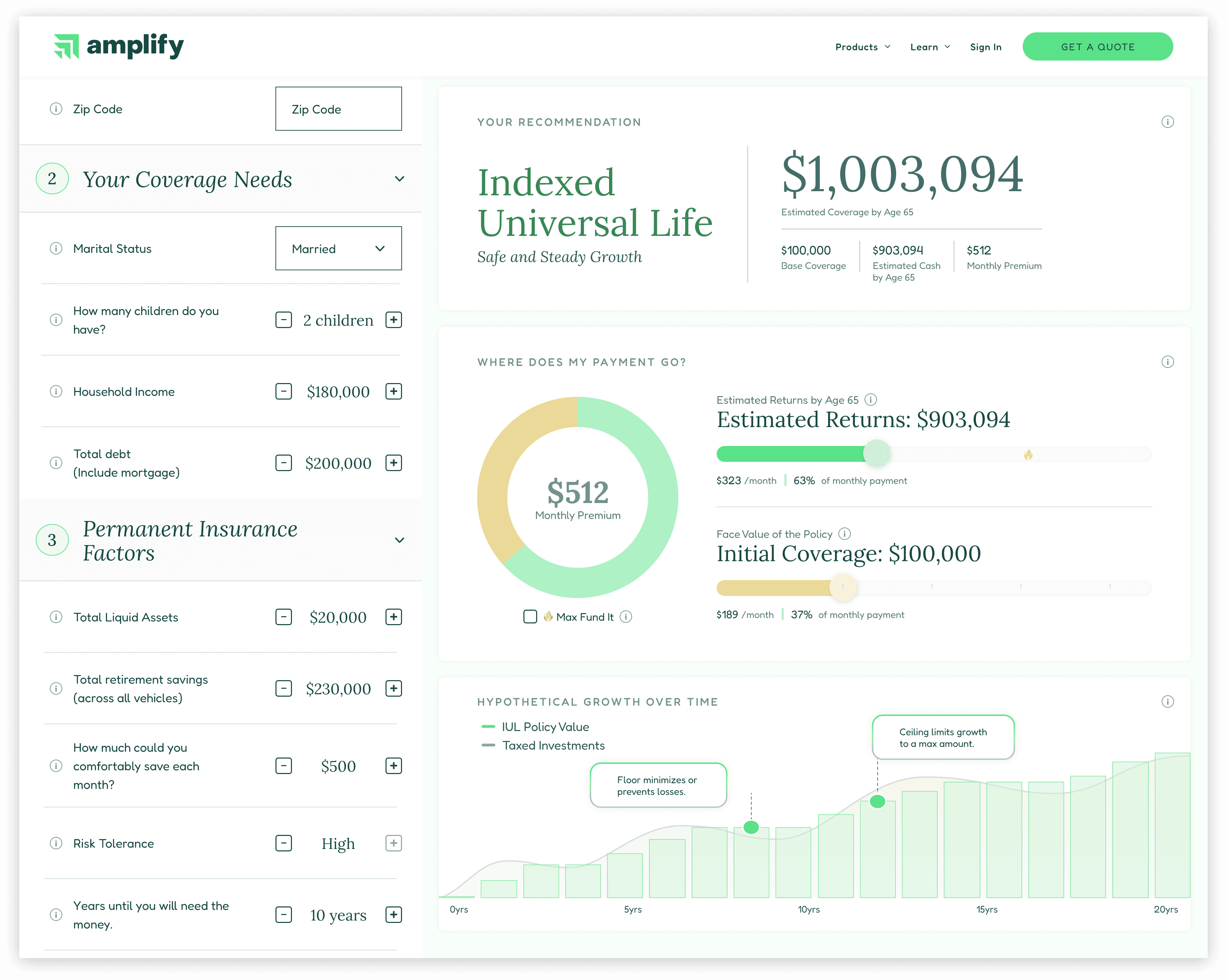
Interactivity

Two sliders are available, depending on the user's priority. Both move together, demonstrating the correlation. "Max-fund" is unchecked here, while it's value is indicated on the "Estimated Returns" slider.

Max-Fund

A "Max-Fund It" checkbox would allow a user to quickly explore the highest non-MEC funding option for maximum return over time. Increasing coverage would increase the max-fund ceiling.

the process

Exploring and eliminating dozens of design options helped the team to arrive at a strong final configuration for this project.

the process

Exploring and eliminating dozens of design options helped the team to arrive at a strong final configuration for this project.

Final Form

Final Form

Progressive Reveal: Information Panels

Progressive Reveal: Information Panels

The final form utilizes information panels to display information. While the user is answering questions, the panels display progress bars, encouraging completion. Once a given panel has enough data to output useful information, it does so. Results are revealed progressively, aligning user actions with outcomes, producing a stronger sense of user agency. This parallel pattern contrasts with a serial one, which would require a user to input a large amount of information up front without seeing results until the end.

The final form utilizes information panels to display information. While the user is answering questions, the panels display progress bars, encouraging completion. Once a given panel has enough data to output useful information, it does so. Results are revealed progressively, aligning user actions with outcomes, producing a stronger sense of user agency. This parallel pattern contrasts with a serial one, which would require a user to input a large amount of information up front without seeing results until the end.

Interactivity: Mutable Values

Interactivity: Mutable Values

We preserved some degree of interactivity with mutable fields for Monthly Premium and Cash Value. These are similar in effect to the slider, but without the expectation of instant results. Each time a user modifies an input, a new call is made and they see a spinner while the information is retrieved.

We preserved some degree of interactivity with mutable fields for Monthly Premium and Cash Value. These are similar in effect to the slider, but without the expectation of instant results. Each time a user modifies an input, a new call is made and they see a spinner while the information is retrieved.

Upsell Opportunities

Upsell Opportunities

Various opportunities existed for upselling. For example, I added a "Power Up" box, allowing a user to add a Term policy to their recommended IUL policy. That set a precedent for other "Power Ups" that could both add to the strength of a policy and increase sale value.

Various opportunities existed for upselling. For example, I added a "Power Up" box, allowing a user to add a Term policy to their recommended IUL policy. That set a precedent for other "Power Ups" that could both add to the strength of a policy and increase sale value.

Progress Indicators

While the user inputs information, they see that they are making progress.
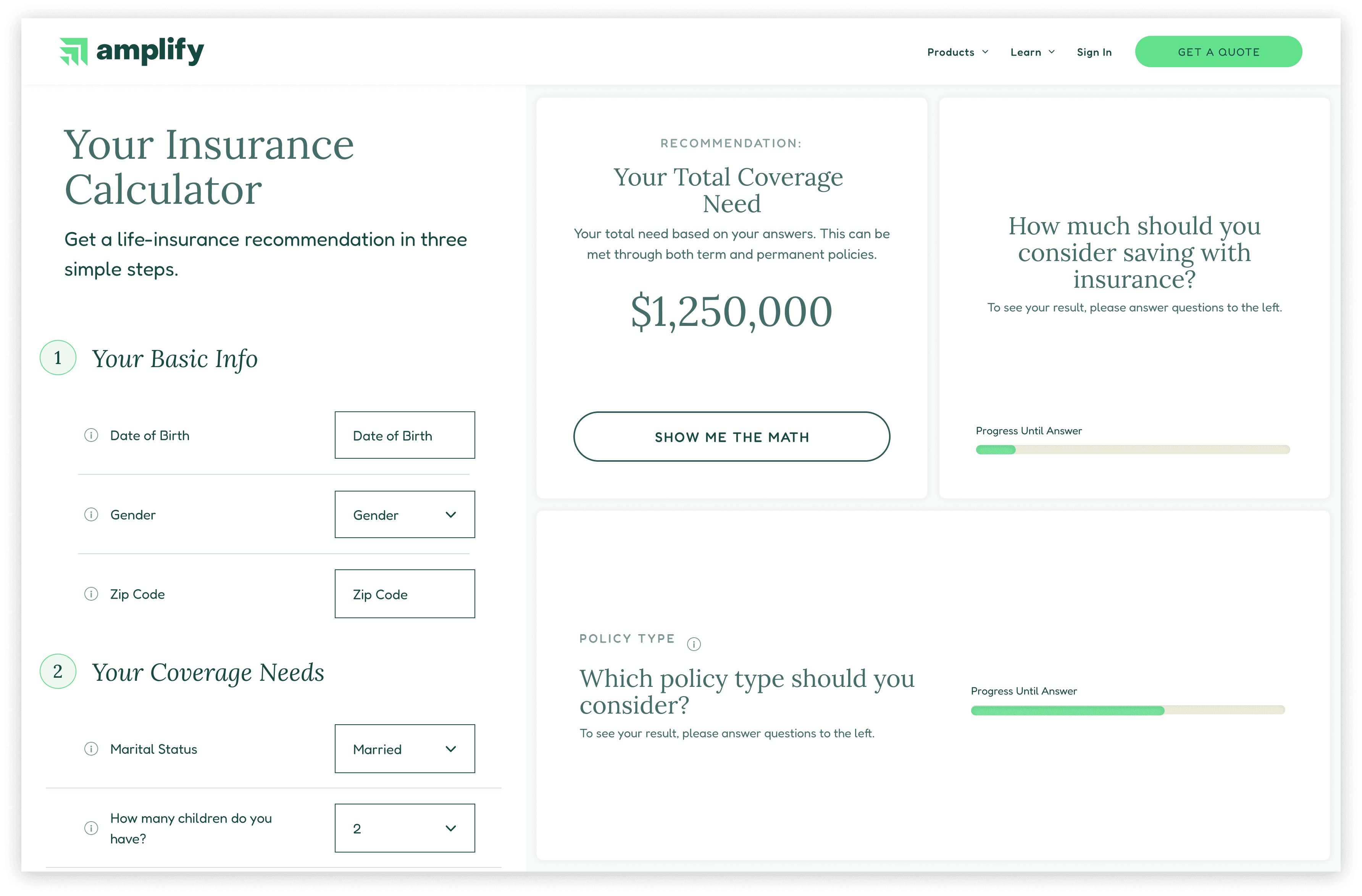
Progressive Reveal

As soon as an information panel can display useful information, it does so, encouraging engagement and completion.

Final Results: Above the Fold

The most important information displays above the fold, here showing the total coverage need, starting coverage, and key mutable stats about the proposed coverage.

Full Results

The full results incorporate a graph to visualize the policy over time, along with additional perks and required legal language.

Delivery

Delivery

Delivery

Delivery

Deliverable Format: Figma link.


Structure: I designed the interface largely using the Style and Component library that I created and maintained for the Product team (pulling in many contributions from others), which is based on the atomic framework. Engineering maintains a copy on their end.

Deliverable Format: Figma link.

Structure: I designed the interface largely using the Style and Component library that I created and maintained for the Product team (pulling in many contributions from others), which is based on the atomic framework. Engineering maintains a copy on their end.

Specs and Instructions

Specs and Instructions

Reducing engineering lift and helping with clean execution means not just designing with modularity, but leaving clear instructions. I left annotations throughout the deliverable to assist engineers in execution. The metric of success here is to have as few questions as possible after delivery. Where necessary, I mocked up animations to demo behavior.

Reducing engineering lift and helping with clean execution means not just designing with modularity, but leaving clear instructions. I left annotations throughout the deliverable to assist engineers in execution. The metric of success here is to have as few questions as possible after delivery. Where necessary, I mocked up animations to demo behavior.

Future Opportunities

Future Opportunities

Pre-qualification

Pre-qualification

If a user were interested, we could treat the calculator as a pre-qualification tool. We could add pages and provide a much more detailed quote. Paired with Amplify's capacity for a 100% digital application, the user could make a purchase decision right from this tool.

Upsell: Partnerships

Upsell: Partnerships

Having acquired somewhat detailed financial information, we could enlist outside partners to provide additional services. This could range from fiduciary advice, to real estate loans, to establishing a trust and will.


Below, you will find a detailed breakdown of the Life Insurance Calculator project, from beginning to end.

the process

Exploring and eliminating dozens of design options helped the team to arrive at a strong final configuration for this project.

user value + business value

This tool allows users to understand how life insurance could benefit their financial situation, and it helps Amplify to contact high quality leads.