
Sales Administration Portal
Sales Administration Portal
Managing Sales Teams Down to Granular Detail
Project Context
Sales Administration Portal
Amplify sought to improve its internal sales platform by creating stronger administration tools. They had a strong parallel goal of white-labeling this software and selling it to brokers throughout the insurance industry.
Managing sales teams down to granular detail
Project Context
Amplify sought to improve its internal sales platform by creating stronger administration tools. They had a strong parallel goal of white-labeling this software and selling it to brokers throughout the insurance industry.
Task & Constraints
Task & Constraints
I was tasked with creating a tool for sales managers to administer teams. This needed to function well for both Amplify internal managers and external groups. Managers needed to access details of each group and individual down to the most granular level. Additionally, the tool needed to be highly extensible to accommodate the needs of any team that might purchase it.
I was tasked with creating a tool for sales managers to administer teams. This needed to function well for both Amplify internal managers and external groups. Managers needed to access details of each group and individual down to the most granular level. Additionally, the tool needed to be highly extensible to accommodate the needs of any team that might purchase it.
My Role
My Role
I polled our sales managers to get a sense of their current workflow, constructed an information architecture paradigm, established initial patterns, and refined the project based on continual feedback from leadership, the product team, and engineering.
I polled our sales managers to get a sense of their current workflow, constructed an information architecture paradigm, established initial patterns, and refined the project based on continual feedback from leadership, the product team, and engineering.
Outcome
Outcome
I created a fully-fledged administration portal that was ideal for both our team and for external clients. Company priorities shifted quickly towards becoming an insurance carrier (for which I was also the lead designer), and unfortunately this project was placed below the line indefinitely.
I created a fully-fledged administration portal that was ideal for both our team and for external clients. Company priorities shifted quickly towards becoming an insurance carrier (for which I was also the lead designer), and unfortunately this project was placed below the line indefinitely.
a significant opportunity
This project allowed Amplify to explore a revenue stream that most insurance brokers could not hope to reach.
a significant opportunity
This project allowed Amplify to explore a revenue stream that most insurance brokers could not hope to reach.
Below, you will find a detailed breakdown of the Sales Administration Portal project, from beginning to end.
Research & Discovery: Chaos
Research & Discovery: Chaos
I polled Amplify sales team managers to understand what tools they were using to administer their teams. I discovered that they were using a mixture of Hubspot, spreadsheets, written documents, and raw human memory. This resulted in ongoing inefficiencies, and made onboarding future managers more difficult.
I polled Amplify sales team managers to understand what tools they were using to administer their teams. I discovered that they were using a mixture of Hubspot, spreadsheets, written documents, and raw human memory. This resulted in ongoing inefficiencies, and made onboarding future managers more difficult.




Information Architecture,
Visual Hierarchy
Information Architecture,
Visual Hierarchy
Information Architecture
Information Architecture
Based on the project brief, at minimum the interface would need to accommodate 5 levels of information architecture:
Agent Portal > Adminstrator Settings > Task Group > Data Row > Individual Data Details
Based on the project brief, at minimum the interface would need to accommodate 5 levels of information architecture:
Agent Portal > Adminstrator Settings > Task Group > Data Row > Individual Data Details
Visual Hierarchy
Visual Hierarchy
That number of layers would require a strong emphasis on both simplicity and visual hierarchy throughout the project, a principle that would be challenged during the later “Integrations” phase.
Following the “Big Rocks” philosophy I worked from the bottom up, structuring the visual hierarchy around the most important “Individual Data Details” layer. This was likely to be the most complex, and to demand the most real estate. As the project progressed, this turned out to be true.
That number of layers would require a strong emphasis on both simplicity and visual hierarchy throughout the project, a principle that would be challenged during the later “Integrations” phase.
Following the “Big Rocks” philosophy I worked from the bottom up, structuring the visual hierarchy around the most important “Individual Data Details” layer. This was likely to be the most complex, and to demand the most real estate. As the project progressed, this turned out to be true.
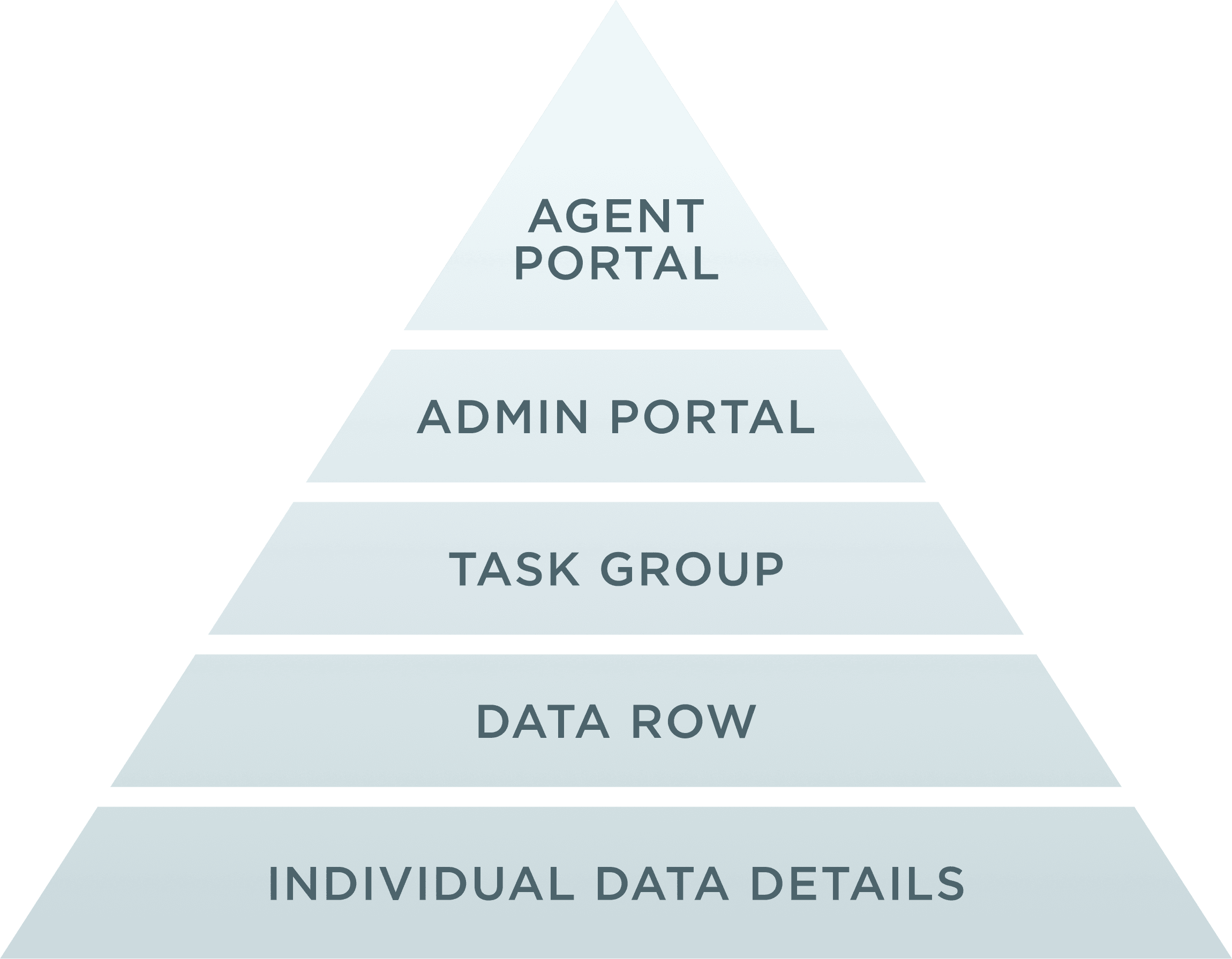
Information Architecture Paradigm
The "Individual Data Details" layer forms the foundation of the project.
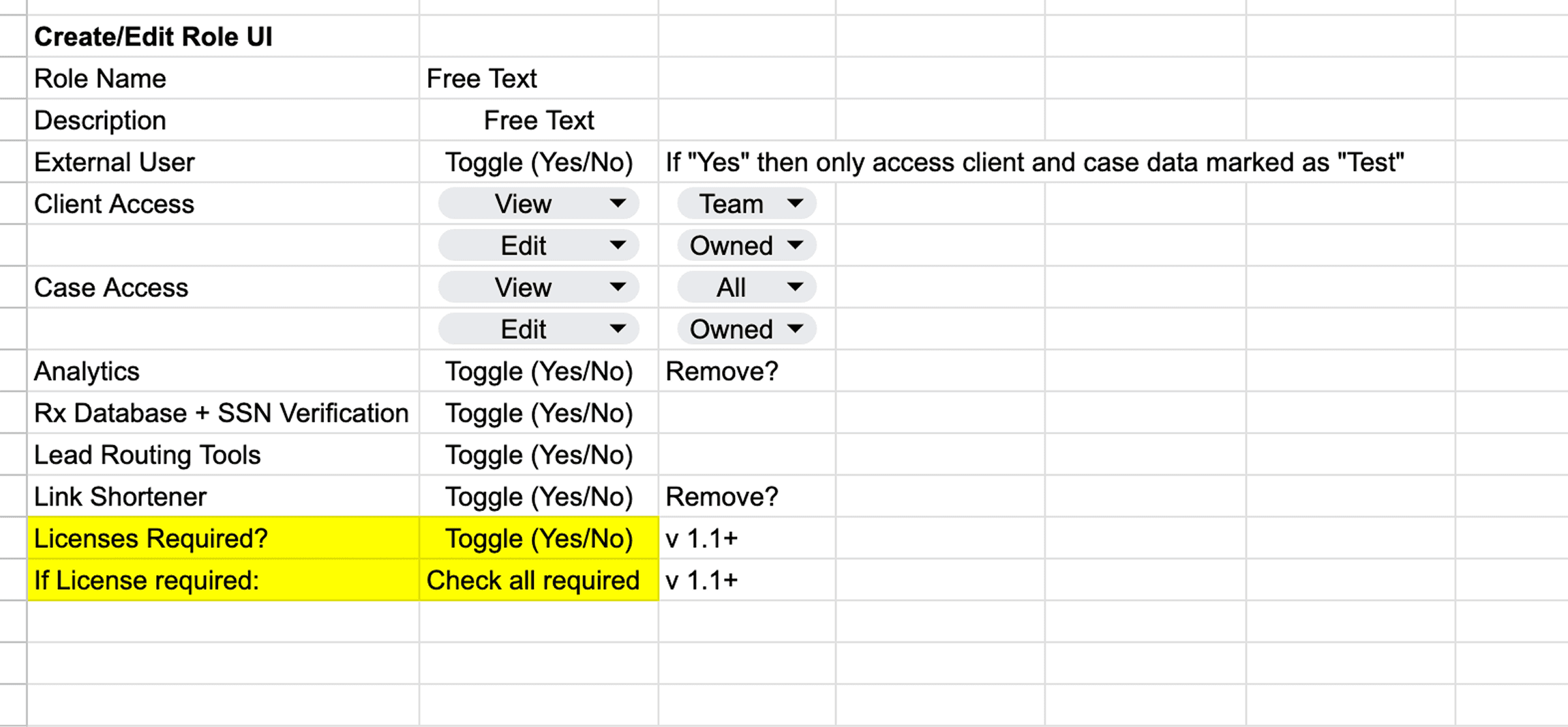
Snippet of Project Brief
Outlines user roles in the “Individual Data Details” layer.
Applying the Information Architecture
Each layer of the hierarchy came together to form a highly effective tool.
thinking ahead
From the beginning, I designed the product to be capable of quickly adapting and expanding based on future needs.
thinking ahead
From the beginning, I designed the product to be capable of quickly adapting and expanding based on future needs.
Patterns & Cross-Team Collaboration
Patterns &
Cross-Team Collaboration
Patterns & Cross-Team Collaboration
An important consideration in all interfaces should be ease-of-engineering. To that end, I sought to create a modular framework with repeating patterns that would reduce engineering lift.
An important consideration in all interfaces should be ease-of-engineering. To that end, I sought to create a modular framework with repeating patterns that would reduce engineering lift.
Pattern: Side Panel
Pattern: Side Panel
I opted for a side-panel pattern, inspired by information-dense administration-focused apps like Notion and Asana. I kept the panel small early on, to preserve scannability on the whole page.
But the team needed stronger future-proof scalability. It needed to accommodate an unknown number of future fields, and needed room to breathe. In response, I expanded it to approximately the small portion of the golden ratio. This covered information on the rest of the page, but that information was secondary to what a user needed on the panel. A larger panel also opened up more options for side-by-side fields, labels and icons.
To accommodate a potentially large set of future field requirements, I also included a “collapse” affordance for each cluster.
I experimented with a tabbed side panel, but we determined that this level of complexity was not yet required, so we stowed that pattern for a future version should it ever become necessary.
I opted for a side-panel pattern, inspired by information-dense administration-focused apps like Notion and Asana. I kept the panel small early on, to preserve scannability on the whole page.
But the team needed stronger future-proof scalability. It needed to accommodate an unknown number of future fields, and needed room to breathe. In response, I expanded it to approximately the small portion of the golden ratio. This covered information on the rest of the page, but that information was secondary to what a user needed on the panel. A larger panel also opened up more options for side-by-side fields, labels and icons.
To accommodate a potentially large set of future field requirements, I also included a “collapse” affordance for each cluster.
I experimented with a tabbed side panel, but we determined that this level of complexity was not yet required, so we stowed that pattern for a future version should it ever become necessary.
Pattern: Tab Group
Pattern: Tab Group
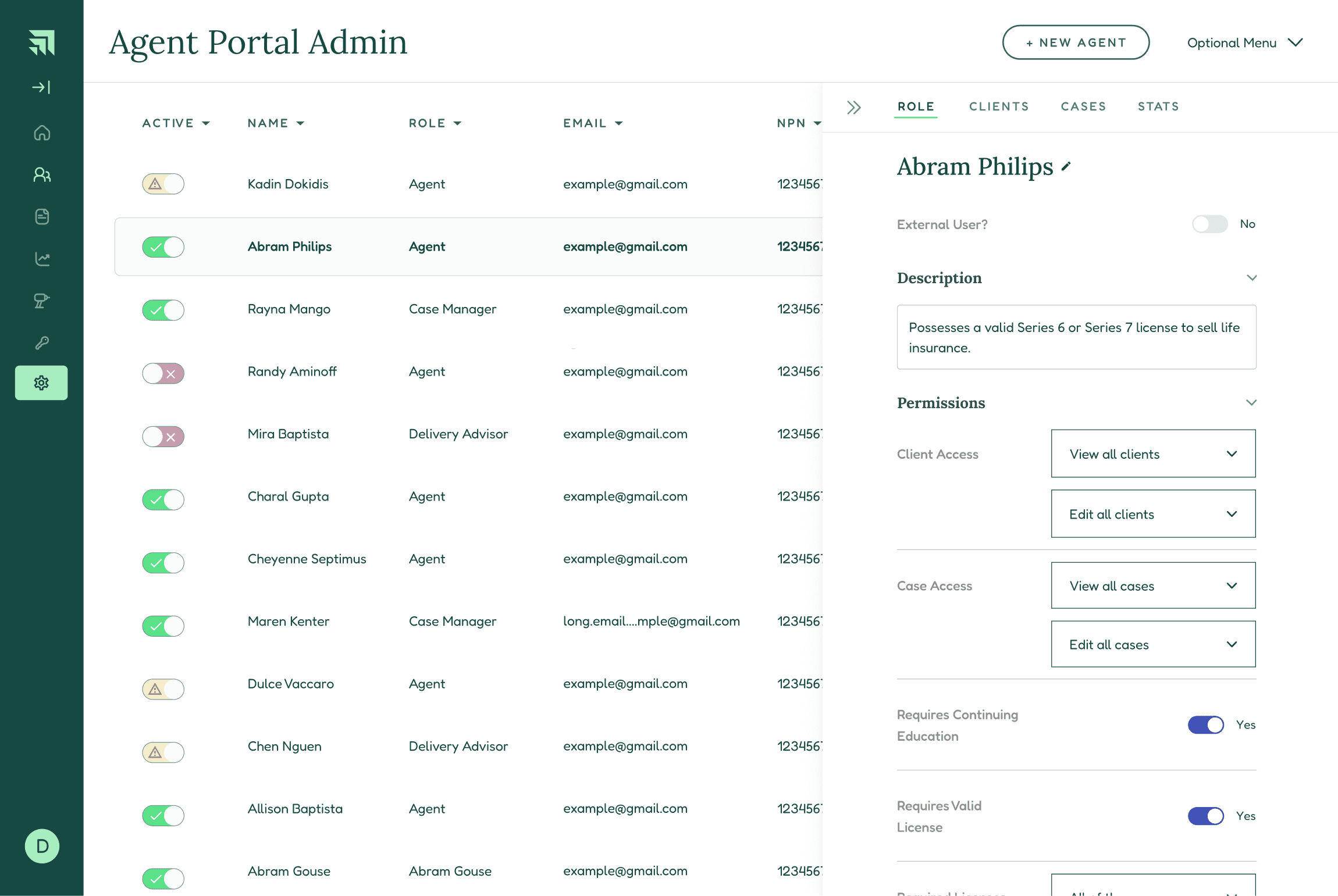
Having built out the visually and cognitively “largest” part of the design (the Individual Data Details layer), I could tackle the next levels upward in the hierarchy. The Data Rows layer lent itself to a straightforward row pattern. Next, to afford administrators the ability to navigate and edit Task Groups, I incorporated tabs on the main panel of the page, adding search functionality to navigate larger data sets.
Having built out the visually and cognitively “largest” part of the design (the Individual Data Details layer), I could tackle the next levels upward in the hierarchy. The Data Rows layer lent itself to a straightforward row pattern. Next, to afford administrators the ability to navigate and edit Task Groups, I incorporated tabs on the main panel of the page, adding search functionality to navigate larger data sets.
Talks with Engineers and Stakeholders
Talks with Engineers and Stakeholders
I circulated the project with engineers and our product team early for feedback. We met several times throughout the design process to run sanity checks against tight engineering resources.
I circulated the project with engineers and our product team early for feedback. We met several times throughout the design process to run sanity checks against tight engineering resources.
Early Draft A
Early side panel exploration
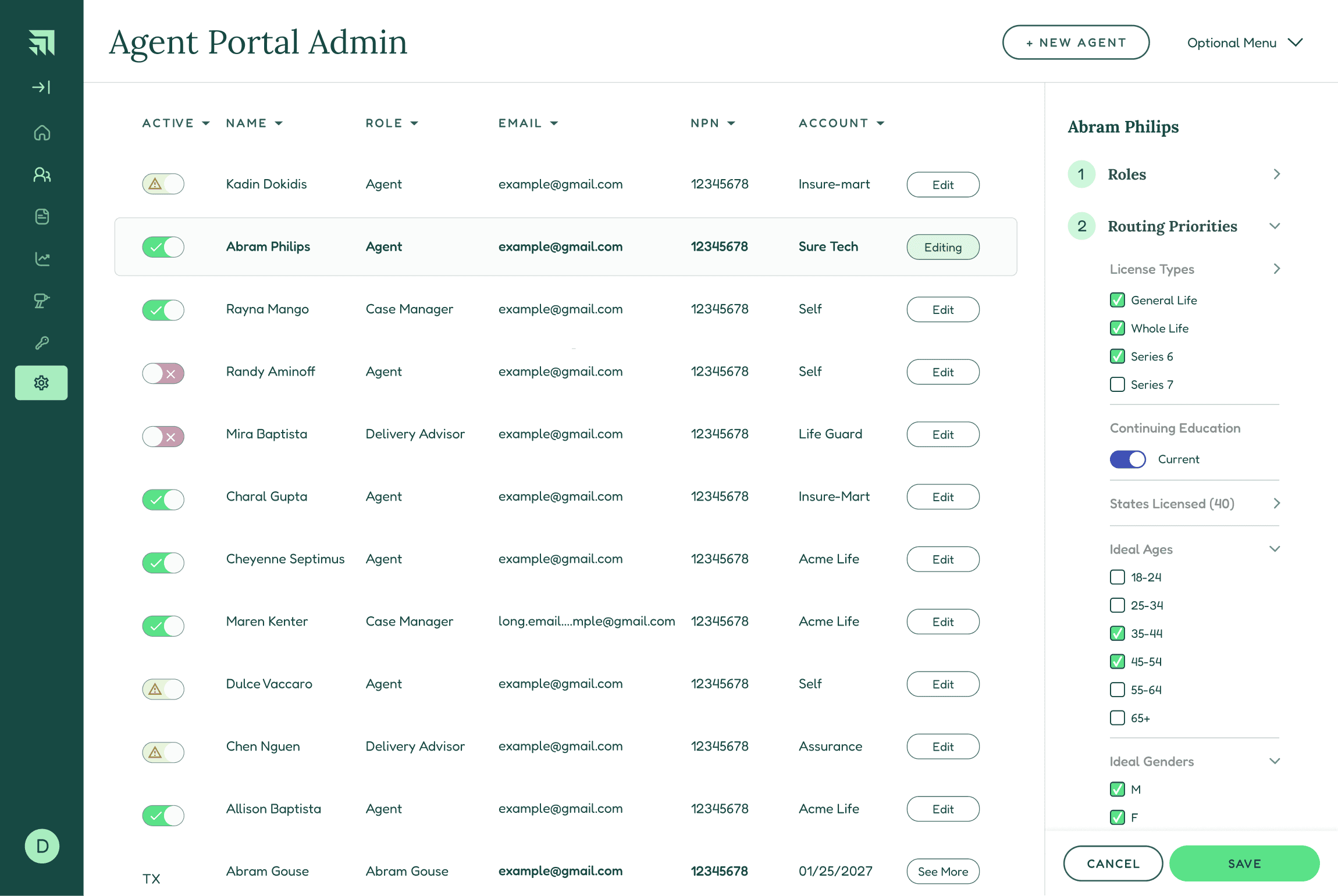
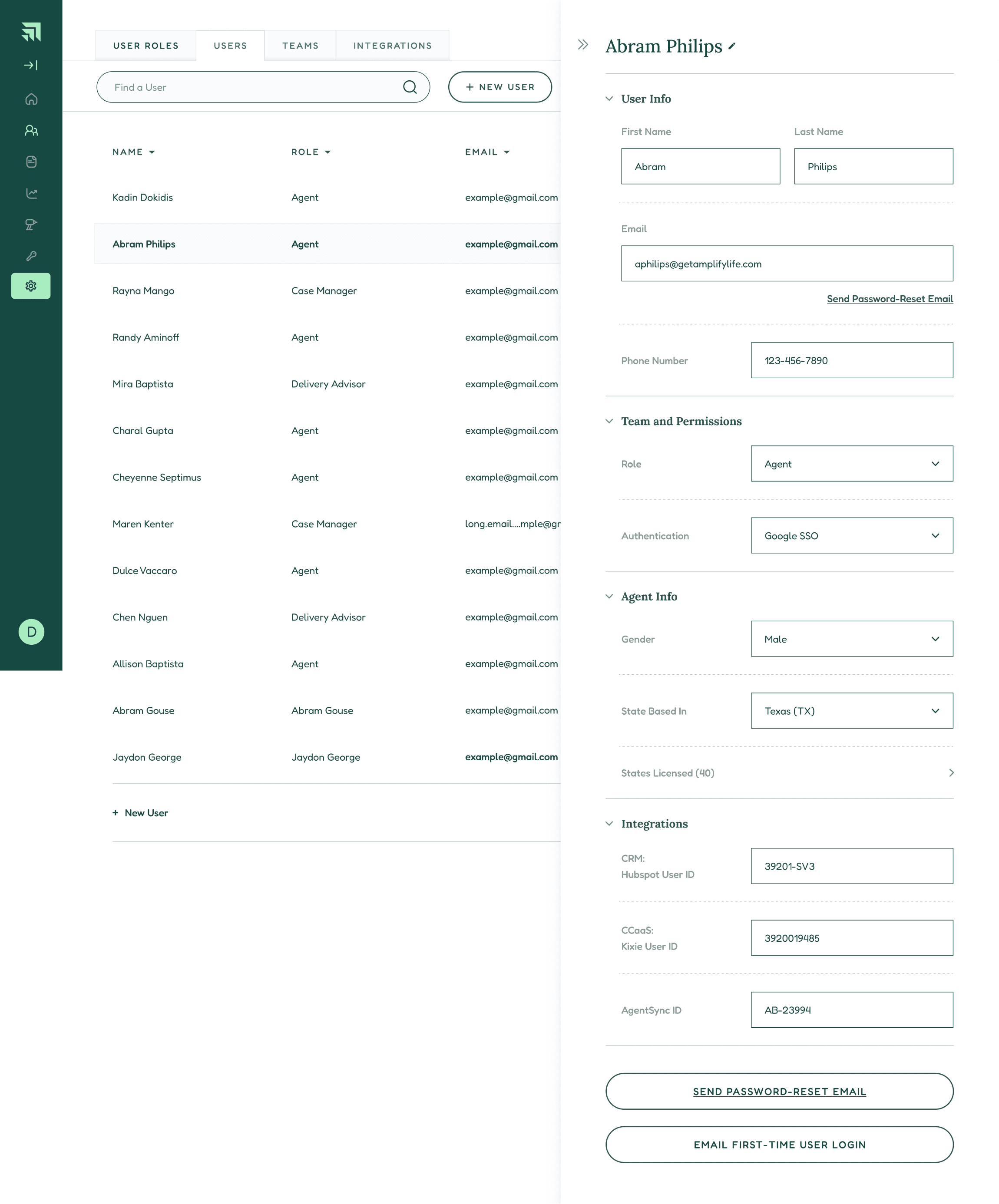
Early Draft B
Increasing real estate for side panel. Incorporating more fields. Auto-save.
Early Draft C
Tabbed architecture. Incorporating more project specs.
Late-Stage Requirement: Third Party Integrations
Late-Stage Requirement: Third Party Integrations
A New Addition
A New Addition
Later in the design process, a new requirement was added: A user must be able to map fields from the Administration Portal into third party tools. We would start with Hubspot, but the architecture also needed to accommodate an arbitrary number of future tools.
That mapping involved two key states:
“Mapped Status”
Q: Has local information propagated to the third party?
A: “Yes” or “No”
“Mapping Relationship”: Should information flow only “one way” from local to third party, or should it be “two way,” thus updatable from either tool?
I experimented with line-based visual mapping patterns, but decided that this violated the principle of extreme simplicity required for this tool. Ultimately, I decided to use a side-by-side field pattern that was afforded by the larger side panel.
Later in the design process, a new requirement was added: A user must be able to map fields from the Administration Portal into third party tools. We would start with Hubspot, but the architecture also needed to accommodate an arbitrary number of future tools.
That mapping involved two key states:
“Mapped Status”
Q: Has local information propagated to the third party?
A: “Yes” or “No”
“Mapping Relationship”: Should information flow only “one way” from local to third party, or should it be “two way,” thus updatable from either tool?
I experimented with line-based visual mapping patterns, but decided that this violated the principle of extreme simplicity required for this tool. Ultimately, I decided to use a side-by-side field pattern that was afforded by the larger side panel.
Mapping Affordance
Mapping Affordance
For the binary “mapping relationship” affordance, a toggle is a simple first choice, but its left/right nature does not naturally correlate to the one-way/two-way mapping relationship. In the end, I used an arrow-based icon set, embedded in a dropdown with a label for extra clarity. Each set of mapped field-pairs also features the icon. V0 required that all mapping relationships update en masse, but the architecture allows each field-set to have independent relationships in the future.
For the binary “mapping relationship” affordance, a toggle is a simple first choice, but its left/right nature does not naturally correlate to the one-way/two-way mapping relationship. In the end, I used an arrow-based icon set, embedded in a dropdown with a label for extra clarity. Each set of mapped field-pairs also features the icon. V0 required that all mapping relationships update en masse, but the architecture allows each field-set to have independent relationships in the future.
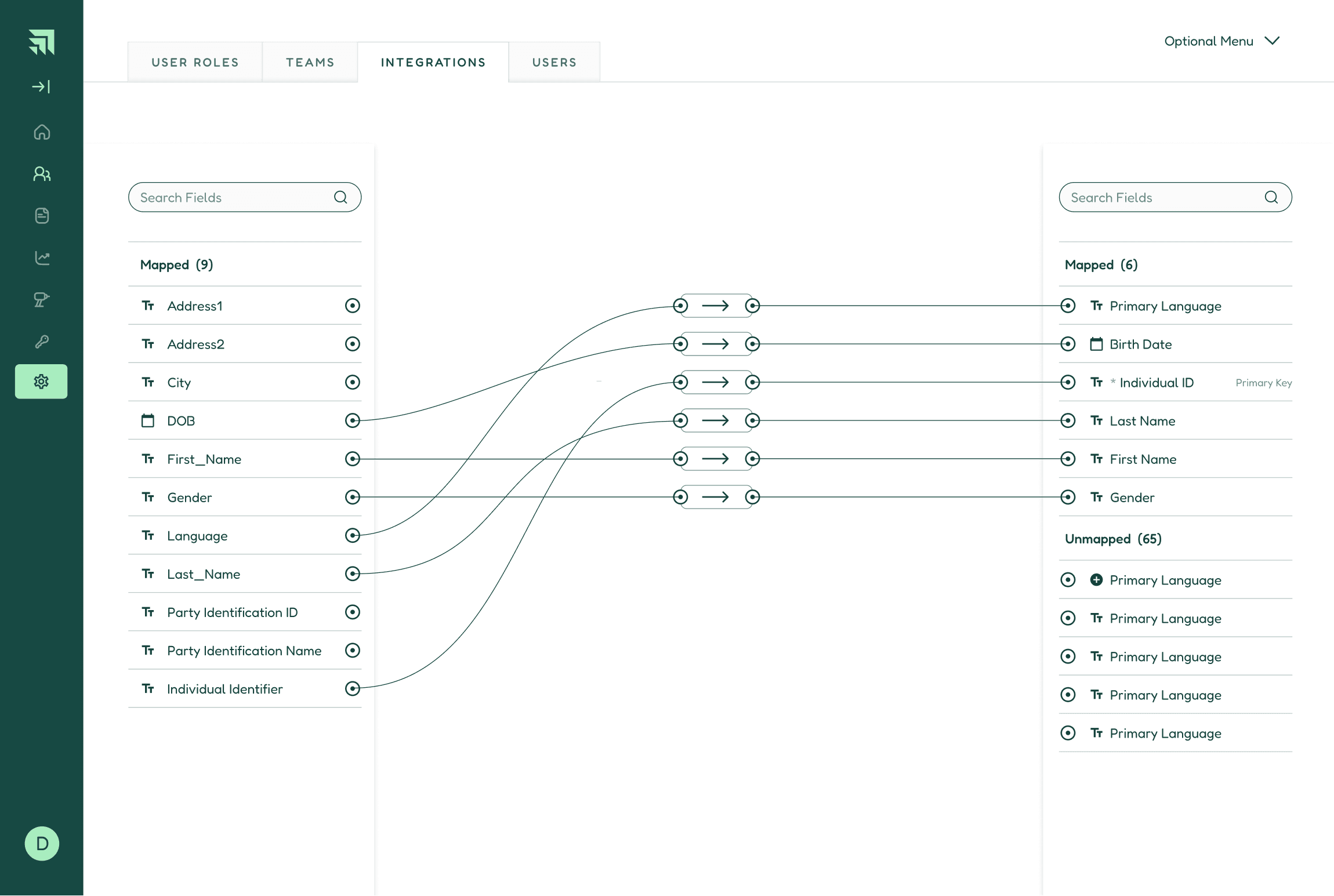
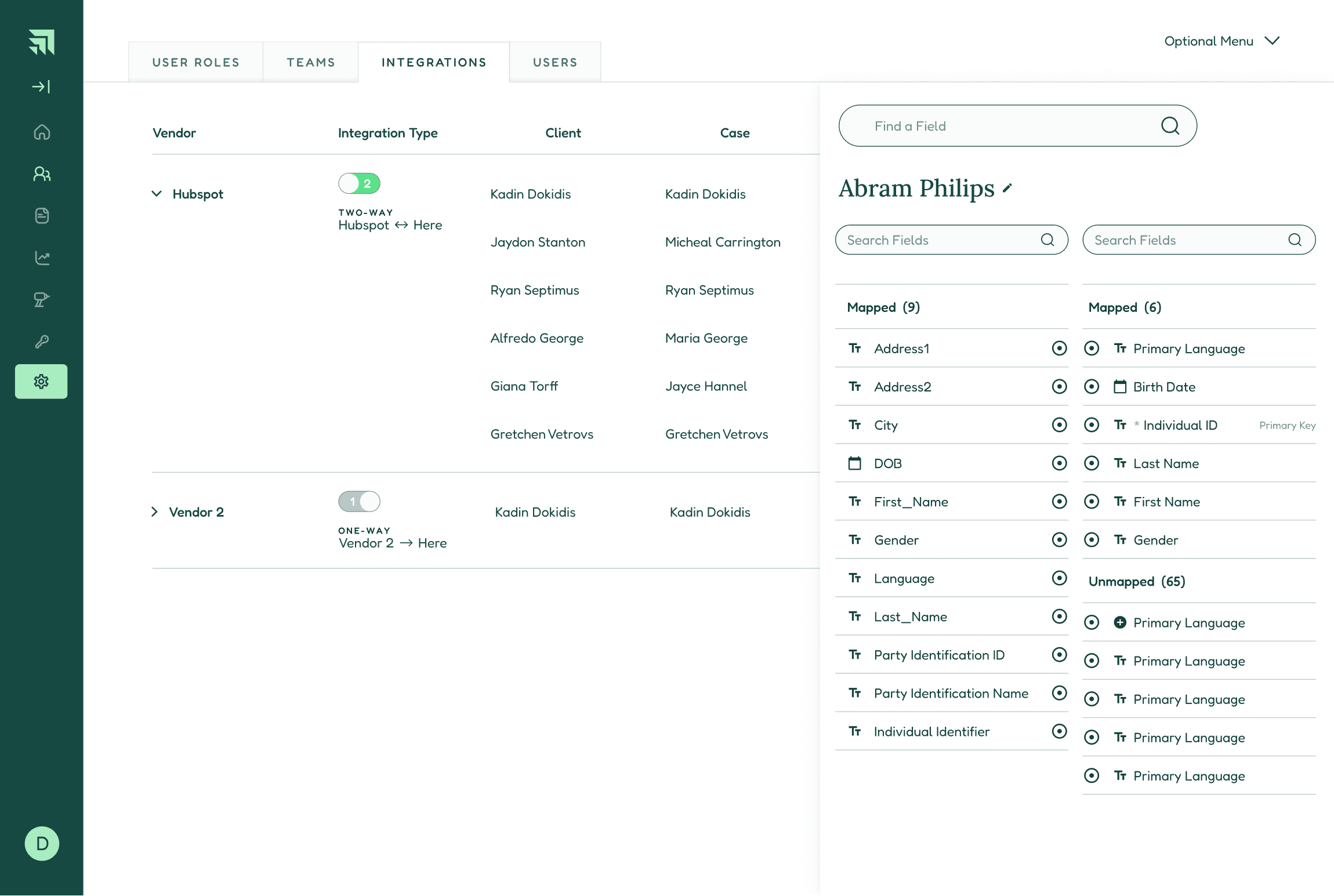
Early Integration Draft A
Full viewport problematic. Visual pathways too complex.
Early Integration Draft B
Side panel hierarchy is lost. Mapping relationships unclear.
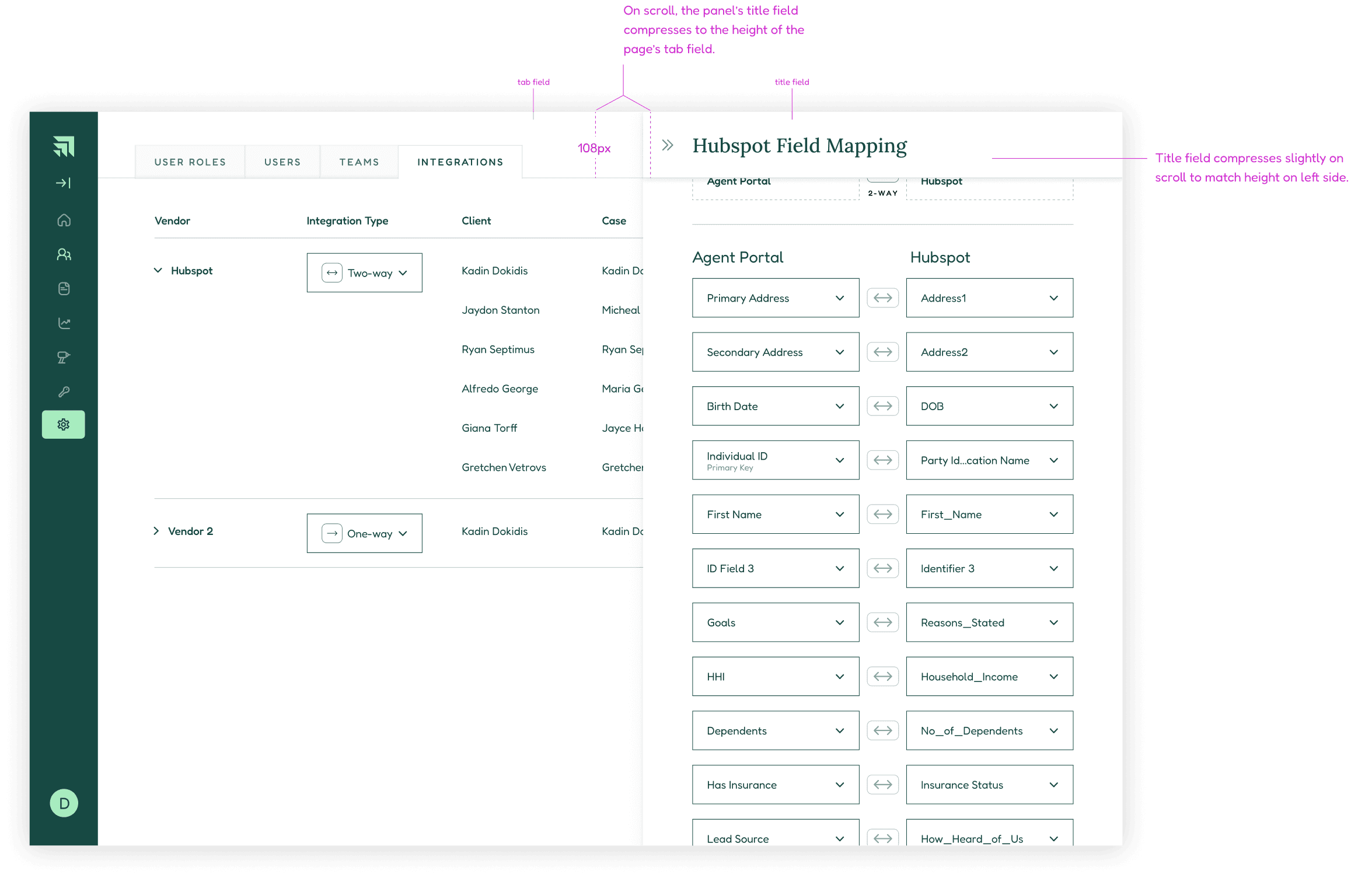
Mature Integration Draft
Side panel hierarchy preserved. Mapping relationships have greater clarity. Screen capture here includes delivery notes.
Third Parties
Integrating with third party databases was an creative challenge that resulted in a much more powerful product.
Third Parties
Integrating with third party databases was an creative challenge that resulted in a much more powerful product.
Delivery & Meta
Delivery & Meta
Delivery
Delivery
Deliverable Format: Figma link.
Structure: I designed the interface largely using the Style and Component library that I created and maintained for the Product team (pulling in many contributions from others), which is based on the atomic framework. Engineering maintains a copy on their end.
Deliverable Format: Figma link.
Structure: I designed the interface largely using the Style and Component library that I created and maintained for the Product team (pulling in many contributions from others), which is based on the atomic framework. Engineering maintains a copy on their end.
Specs and Instructions
Specs and Instructions
Reducing engineering lift and helping with clean execution means not just designing with modularity, but leaving clear instructions. I left annotations throughout the deliverable to assist engineers in execution. The metric of success here is to have as few questions as possible after delivery. Where necessary, I mocked up animations to demo behavior.
Example: In this project, the rule set around “User Permissions” required a detailed set of instructions.
Reducing engineering lift and helping with clean execution means not just designing with modularity, but leaving clear instructions. I left annotations throughout the deliverable to assist engineers in execution. The metric of success here is to have as few questions as possible after delivery. Where necessary, I mocked up animations to demo behavior.
Example: In this project, the rule set around “User Permissions” required a detailed set of instructions.
Edge Cases
Edge Cases
I caught and corrected edge cases both indepdenently and in talks with engineers. Two examples include:
Toast notification stack when many team members, including managers, are deleted using a “Teams” panel
Long key names are center-truncated, and reveal on hover in the “Integrations” tab
I caught and corrected edge cases both indepdenently and in talks with engineers. Two examples include:
Toast notification stack when many team members, including managers, are deleted using a “Teams” panel
Long key names are center-truncated, and reveal on hover in the “Integrations” tab
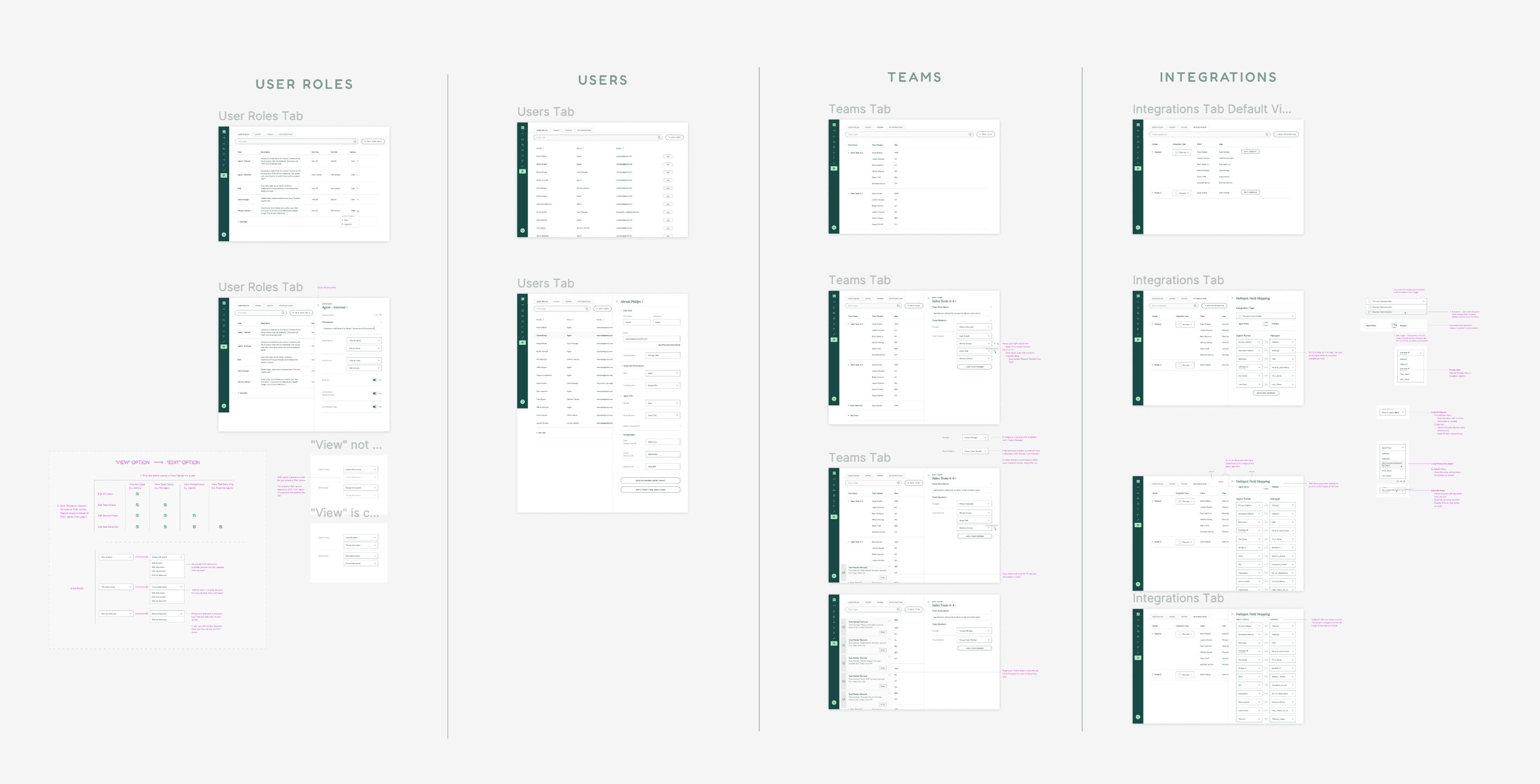
Figma Deliverable
Functionality delineated into columns. Includes notes for engineers.
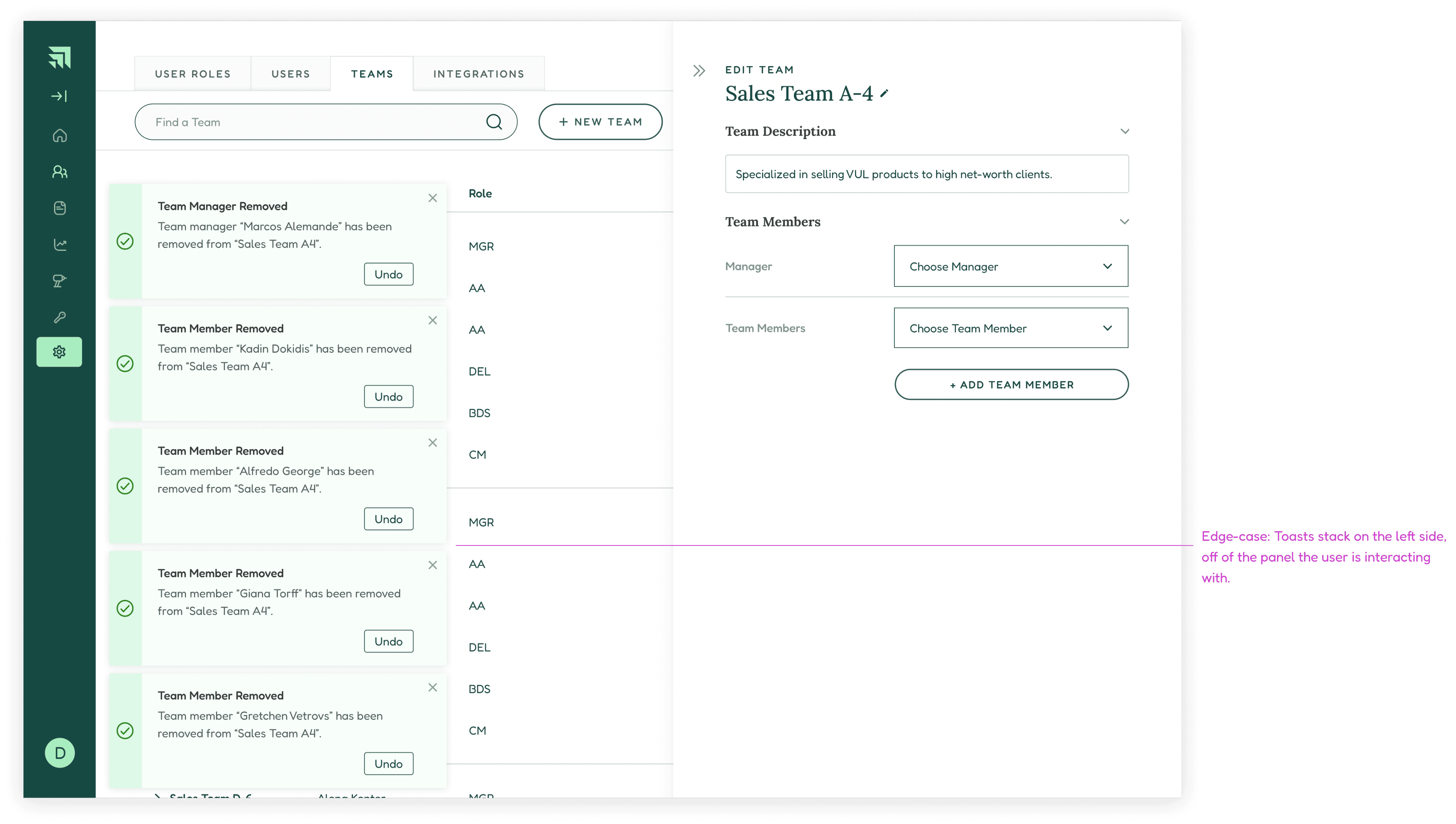
Edge Case: Toasts
Confirmation toasts do not interfere with operation of side panel.
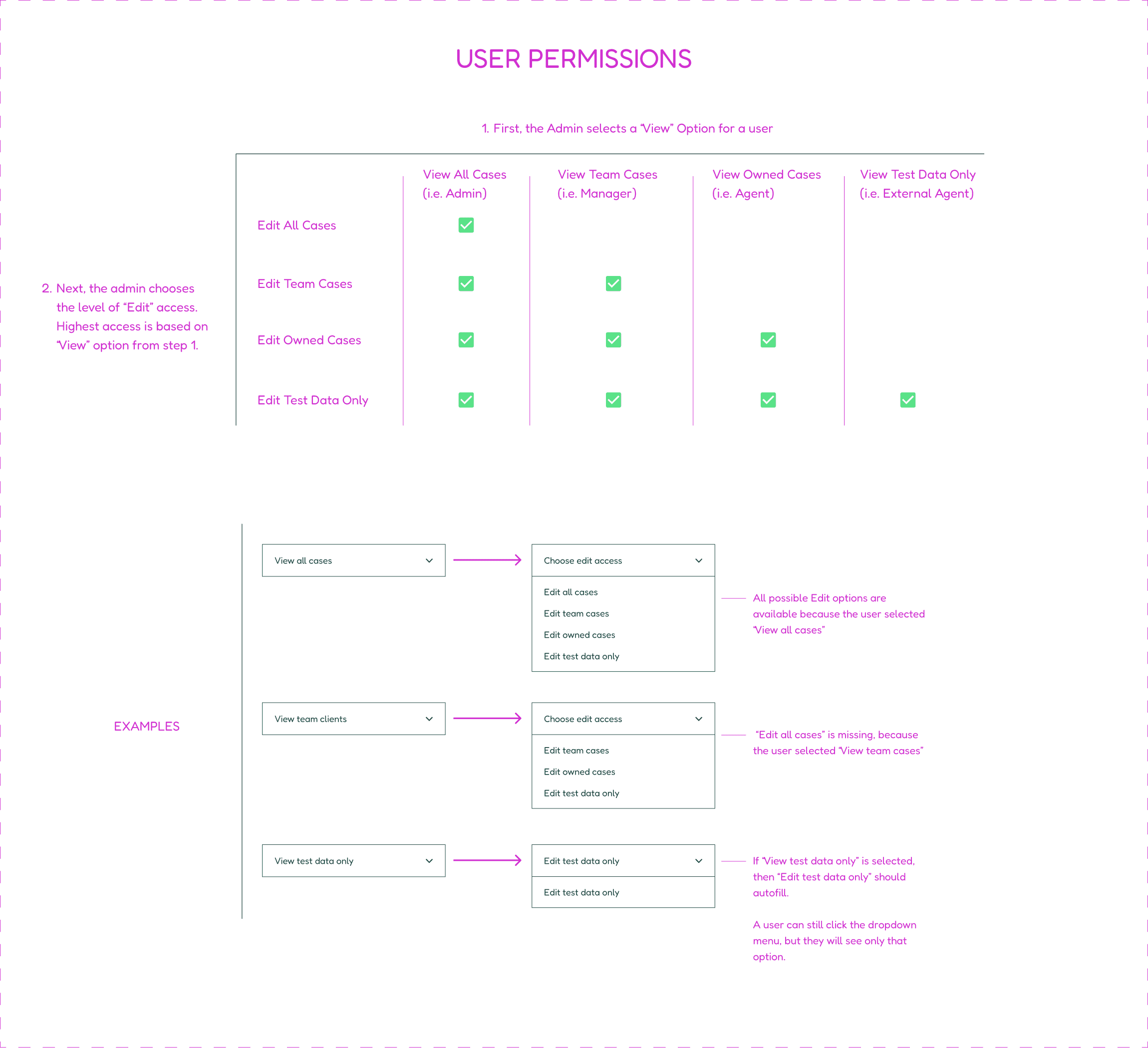
Detail: Notes for Engineers on Permissions
Clarifies functionality regarding user roles and information access.
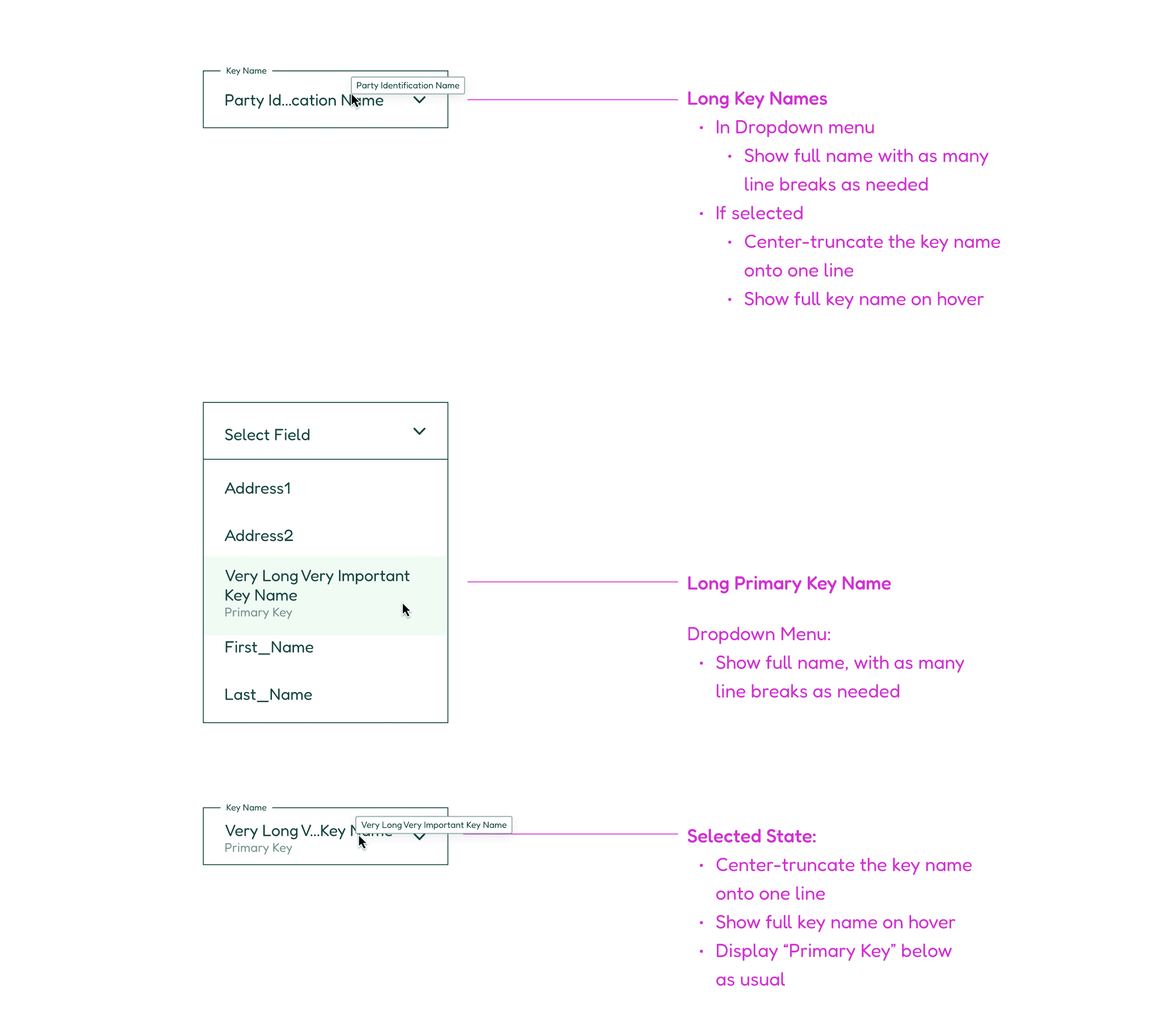
Edge Case: Long names
Mapped names must truncate within existing fields, yet be legible regardless of length.
Final Outcome
Final Outcome
The final form provided administrators with a broad set of capabilities for organizing their teams. Although the number of potential user actions was vast, the modular design afforded them all in an intuitive interface, with tremendous room to expand.
The final form provided administrators with a broad set of capabilities for organizing their teams. Although the number of potential user actions was vast, the modular design afforded them all in an intuitive interface, with tremendous room to expand.
Future Opportunities
Future Opportunities
Room to Grow
Room to Grow
A requirement for this feature was future scalability. That can be accomplished in several ways, at each of the bottom three layers of the information hierarchy.
Task Group Layer
Task Group Layer
Administrators may create any number of teams.
For groups of teams, we could include a filter to select a department before scanning the page.
Search functionality can be expanded to incorporate filters, for finding single entries in truly large data sets.
Data Row Layer
Data Row Layer
Include a “customize” affordance for power users to increase the number of information columns that display by default.
Individual Data Details Layer
Individual Data Details Layer
Re-integrate the tabbed architecture in the side panel from early drafts.
Add search functionality within the panel to find data clusters among a large numbers of fields.
Allow each field-set in the Integrations panel to update independently.